

Strapi Serverless
Run a Strapi headless CMS on your own AWS account with Microtica's Strapi Serverless template — Fargate, RDS, EFS, and S3 provisioned for you.
Strapi is an open-source headless CMS built with NodeJS. With Strapi you design and publish the content your apps consume via API. Its admin UI lets you design data models and create and manage content.
The Strapi Serverless template on Microtica keeps setup simple and maintenance low while the infrastructure runs on your own AWS account. It follows a GitOps and declarative-infrastructure approach for stable, reliable, and predictable deployments.
With this template, Strapi can coexist with your existing AWS infrastructure, and you can always extend the setup with more cloud resources.
Infrastructure ownership
The Strapi infrastructure will be provisioned on your own AWS account.
You retain full control over your infrastructure and data while getting all the benefits of infrastructure automation.
One-click deploy
Click Deploy with Microtica below and follow the template steps to deploy your Strapi application on your AWS account.

What will be provisioned on AWS
Since Microtica deploys on your cloud account, you get complete transparency over which resources will be provisioned.
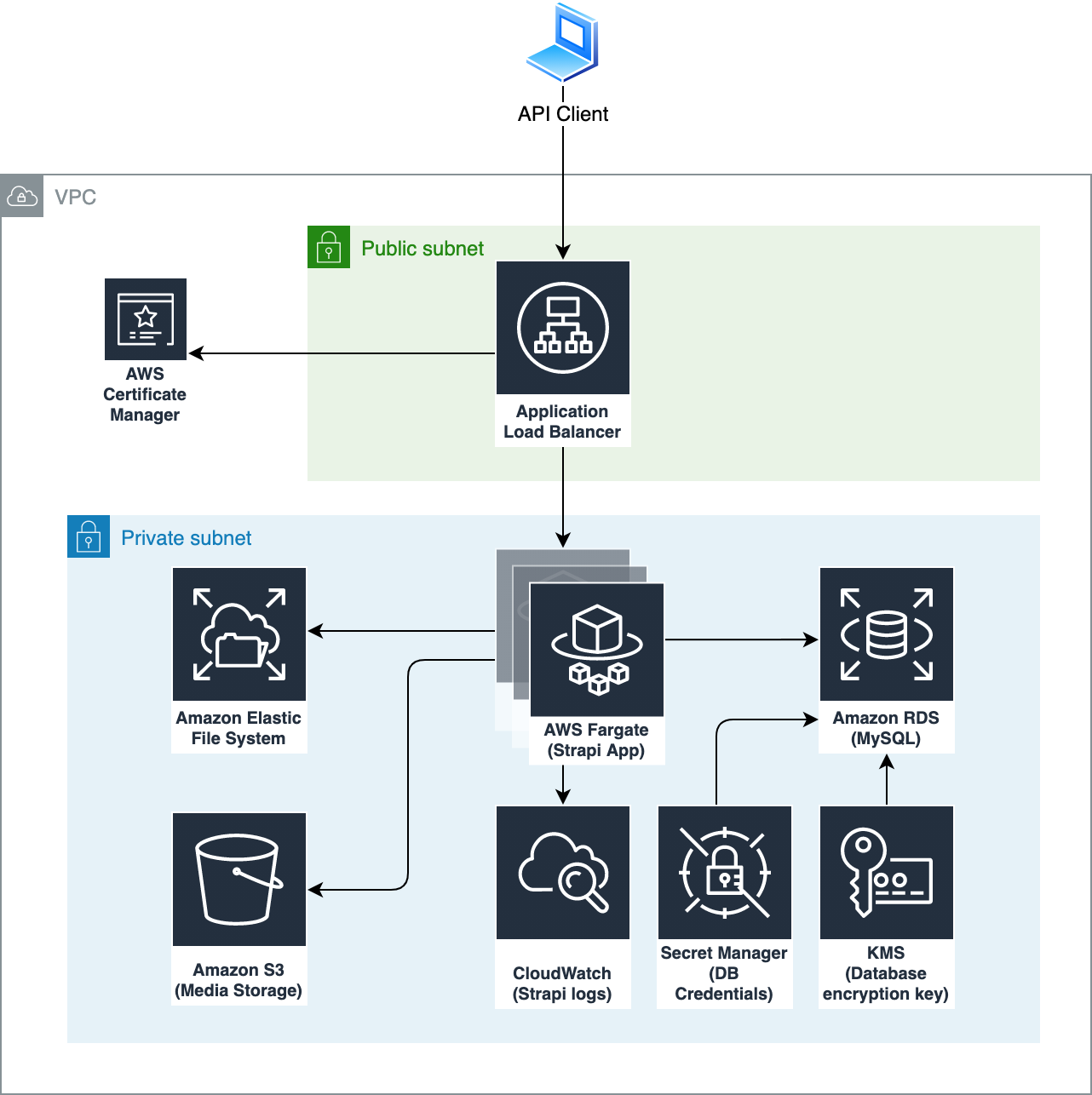
The Strapi Serverless template creates two components in the environment:
- VPC — VPC, subnets and networking
- Strapi — Container infrastructure based on Fargate, application load balancer, persistent storage, relational database and S3 storage.
Persistent storage
The Strapi Serverless template uses an Amazon EFS file system to store the persistent Strapi files:
- image uploads — media files storage
- api folder — only for the standalone setup where you don't have your source code connected via Git (default). In this guide, we explain how to deploy your existing Strapi project
- data folder — stores the sqlite data file, if the database client is sqlite (default)
The data stored in these folders persists across subsequent deployments, application restarts, or even if you kill the container completely.
Relational database
The template provisions an RDS database only if the database client is mysql or postgres.
The database is encrypted using a custom KMS key. The database password is generated automatically and stored securely in an AWS Secret Manager secret.
Container environment
By default, the template provisions an AWS Fargate cluster with one container. For production environments, we recommend at least two containers running all the time. This also ensures zero-downtime deployments.
The Fargate services are exposed via an Application Load Balancer. When you use a custom domain — recommended for production — the domain certificate is attached and SSL termination happens on this load balancer.
Since we use persistent file storage, all containers share the same file system.
Strapi logs
The Strapi application logs are stored in CloudWatch Logs. Monitor the logs from the Fargate console under tasks. The default log retention is 90 days.
Environment variables
These environment variables are provided in the Strapi application runtime.
| Variable | Description |
|---|---|
| AWS_BUCKET | The name of the S3 bucket used for storing the media files. |
| AWS_REGION | The AWS region in which the infrastructure is deployed. |
| DATABASE_CLIENT | Type of the database to be used. Possible values: sqlite, mysql and postgres. |
The following environment variables are provided only when DATABASE_CLIENT is set to mysql or postgres.
| Variable | Description |
|---|---|
| DATABASE_HOST | Host of the RDS database. |
| DATABASE_PORT | Port of the RDS database. |
| DATABASE_NAME | The name of the database (default is strapi). |
| DATABASE_USERNAME | Database username. |
| DATABASE_PASSWORD | Database password. |
| DATABASE_SECRET_ARN | ARN of the Secret Manager secret where database connection information is securely stored. This parameter can be used as an alternative to the separate database parameters above. |
Estimated AWS cost
The estimated AWS cost depends on the configuration of the Strapi infrastructure. Below is the cost breakdown for different configurations, assuming the resources run all the time:
- sqlite with one app container (0.25 vCPU and 0.5GB memory) costs around $30/month
- MySQL with one app container (0.25 vCPU and 0.5GB memory) costs around $45/month
- PostgreSQL with one app container (0.25 vCPU and 0.5GB memory) costs around $55/month
- each additional container with the default config is $14/month
Additional costs apply for using AWS EFS to store media files (~$0.09 GB/month).
You can reduce the cost of your non-production Strapi environments with our AWS Cost Optimization feature that is coming soon.
Optimize AWS cost
To save costs while running Strapi in a non-production environment, run it Monday to Friday, 8 hours per day. This schedule can cut your cloud expenses by at least 65%.
In the Resources or Cost Dashboard, create a Saving Schedule to apply these savings.

Next steps
Templates
Provision AWS infrastructure and deploy apps in minutes with Microtica's pre-built templates, built by certified AWS architects for security and scale.
Deploy a new Strapi app
Deploy a new Strapi app on your own AWS account with Microtica in under 10 minutes — ready infrastructure built on GitOps and declarative deployments.