

Stages
Group pipeline steps into stages to run them in parallel. Declare stages in your microtica.yaml, assign steps to them, and structure complex pipelines.
Stages let you organize complex pipelines that have many steps. You group steps into stages, and the steps within a stage run in parallel.
Syntax
Declare stages with the stages property in the pipeline YAML, listing the stage names in an ordered list. Steps then reference a stage by name.
All steps assigned to a certain stage are executed in parallel.
You can assign one stage to multiple steps, but you can't assign a step to multiple stages.
Steps that aren't assigned to any stage are automatically assigned to the default stage, which runs first.
Here is the skeleton of a pipeline with stages:
stages:
  - [first-stage-name]
  - [second-stage-name]

steps:
  step_1:
    stage: [first-stage-name]
    [step-body]
  step_2:
    stage: [second-stage-name]
    [step-body]
Pipeline with multiple stages
In this example, you build a pipeline with two stages and three steps.
Here is a graphical preview of the pipeline:
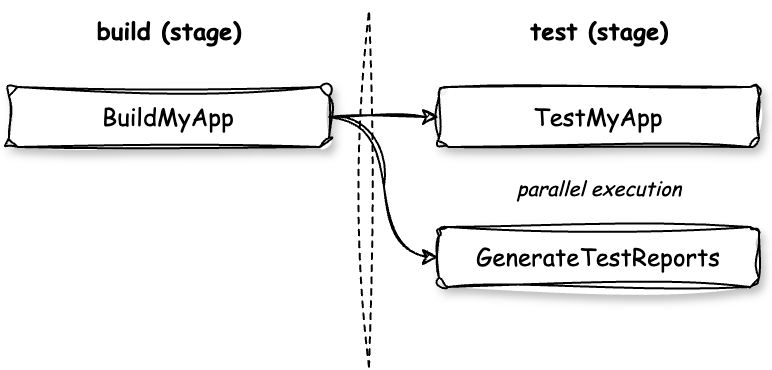
The pipeline defines two stages, build and test, and three steps: BuildMyApp in the build stage, and TestMyApp and GenerateTestReports in the test stage.
stages:
 - build
 - test

steps:
  BuildMyApp:
    stage: build
    image: node:latest
    commands:
      - npm install
      - npm run build
  TestMyApp:
    stage: test
    image: node:latest
    commands:
      - npm test
  GenerateTestReports:
    stage: test
    image: node:latest
    commands:
      - npm run generate-reports
The pipeline runs the BuildMyApp step first. When that step finishes successfully, the TestMyApp and GenerateTestReports steps run in parallel.
Once both steps in the test stage finish successfully, the pipeline execution is complete.
Next steps
Terraform Build
Package Terraform templates into a deployable Microtica component with the terraform-build step. Map variables.tf and outputs.tf to component input and output.
Artifacts
Persist a pipeline step's output with Microtica artifacts. Store deployable file packages, structured JSON you reference from other steps, or container images.