

Deployments
Build, test, and deploy your applications with Microtica's CI/CD. Trigger pipelines on every commit and ship to AWS environments automatically.
Microtica builds, tests, and deploys your applications through CI/CD pipelines. You connect a Git repository, define the steps, and Microtica runs them on every change to ship your code to a cloud environment.
What CI/CD does
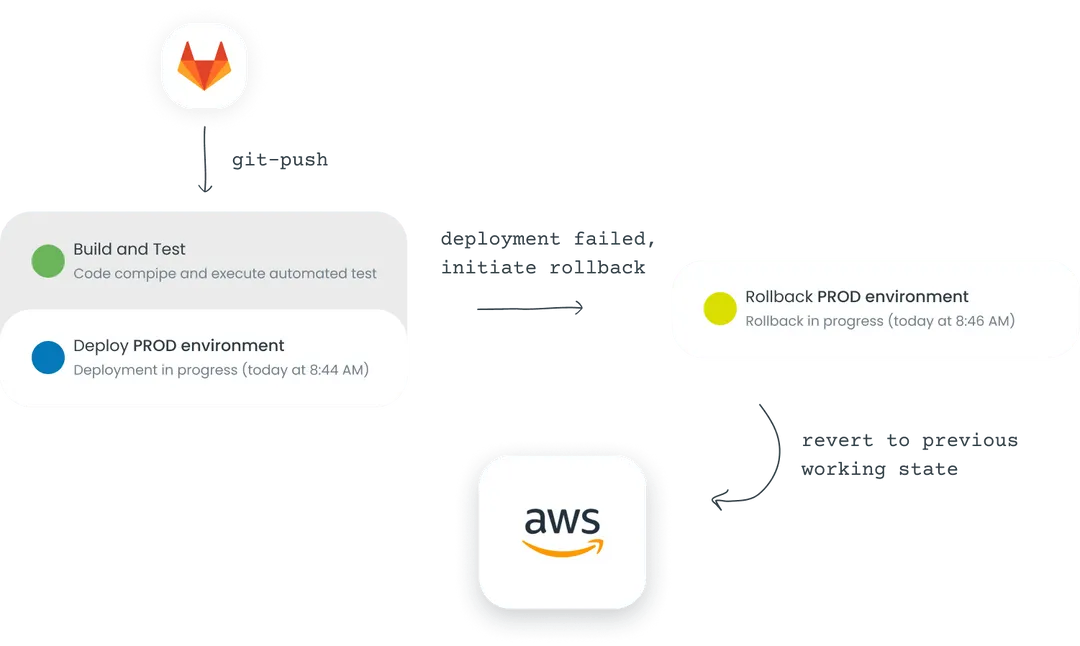
CI/CD combines continuous integration, continuous deployment, and continuous delivery into a single workflow. Instead of building, testing, and releasing by hand, you describe those steps once and Microtica runs them automatically whenever your code changes.
Why use it
Building, testing, and deploying by hand is slow and easy to get wrong. Automating those steps lets you:
- Ship faster. Automate the compilation, testing, and packaging of your code so you spend less time on repetitive tasks and release more often.
- Keep code quality high. Run unit, integration, and end-to-end tests on every change to catch bugs before they reach production.
- Deploy continuously. Push your applications to development, staging, and production environments automatically, so they stay up to date with reliable releases.
- Collaborate in one place. Manage code changes, builds, and deployments from a single platform with shared visibility across the pipeline.
Features
Microtica's CI/CD supports your development and deployment workflows with:
- Automated builds. Configure and automate the build process for your applications with Microtica Pipelines.
- Testing automation. Set up automated tests to keep code quality high and reduce the risk of errors.
- Deployment automation. Deploy your applications to Kubernetes clusters or cloud platforms like AWS (Azure and GCP coming soon).
- Version control integration. Connect GitHub, BitBucket, GitLab, or CodeCommit to version and track your code changes.
- Environment management. Create, manage, and provision development, staging, and production environments for your applications.
- Monitoring and logs. Track the performance and health of your applications with real-time monitoring and access to logs.
- Rollbacks and rollouts. Microtica performs automated rollbacks to quickly revert changes.
- Notifications and alerts. Stay informed about the status of your builds and deployments with configurable notifications.
Next steps
Variables
Parametrize Microtica pipelines with custom and predefined variables. Reference built-in values like MIC_PIPELINE_EXECUTION_ID and store secrets securely.
Deploy manually from the UI
Trigger a deployment by hand from the Microtica console, pick the branch to deploy, and follow the pipeline logs in real time as your app ships.