

Variables
Parametrize Microtica pipelines with custom and predefined variables. Reference built-in values like MIC_PIPELINE_EXECUTION_ID and store secrets securely.
Custom variables let you parametrize how your pipeline works. In every pipeline, Microtica also injects a predefined set of variables such as MIC_PIPELINE_EXECUTION_ID, MIC_USER_NAME, and MIC_COMMIT_REF, which you can use alongside your custom variables.
Use pipeline variables when you want to:
- parametrize the way your pipeline works
- avoid hard-coding within the step execution logic
- avoid storing sensitive information within the pipeline YAML
Microtica offers two types of variables:
- plaintext variables
- sensitive variables
Add variables when you create or modify a pipeline from the GUI. Environment variables automatically become available in the pipeline runtime environment through standard Unix syntax, ${variable-name}.
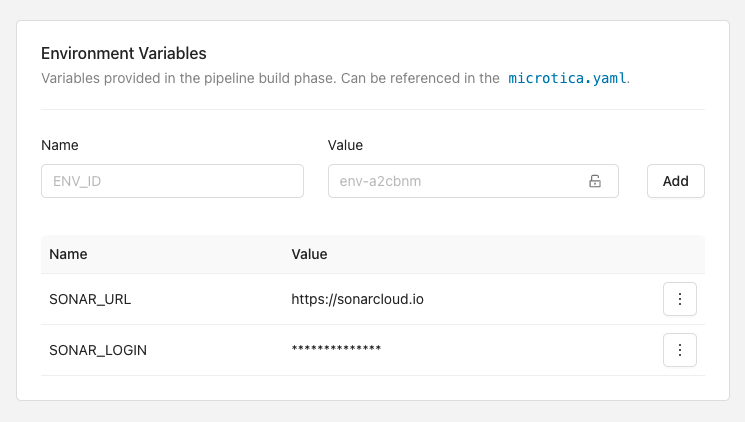
The following example uses two custom variables, SONAR_URL and SONAR_LOGIN.
You can reference custom variables and Microtica predefined variables directly in the step parameters. Here, the Docker image tag is set to the value of {{MIC_PIPELINE_EXECUTION_ID}}.
steps:
  AnalyseApp:
    image: node:latest
    commands:
      - sonar-scanner -Dsonar.host.url=${SONAR_URL} -Dsonar.login=${SONAR_LOGIN}
  DockerPush:
    type: docker-push
    image_name: microtica/user-service
    tag: "{{MIC_PIPELINE_EXECUTION_ID}}"
    registry: dockerhub
Because the SONAR_LOGIN variable is marked as sensitive, its value is stored encrypted and decrypted securely only within the step execution boundary.
Usage syntax
Use ${variable-name} syntax when you want to reference the built-in or custom environment variables from the commands section (i.e. step runtime instructions).
Use "{{variable-name}}" syntax as a templating in the microtica.yaml file. Variables will be replaced with the respective values before pipeline execution.
When using templating, always put variables in quotation marks.
Security consideration
Never hard-code sensitive data in pipeline YAML.
For security reasons, always enable the sensitive flag when specifying parameters like passwords, secret tokens, or any other data considered sensitive.
Predefined variables
In each step execution, Microtica automatically injects a set of predefined variables you can use within the pipeline.
| Variable | Description |
|---|---|
| MIC_COMMIT_TYPE | The type of reference with the change. Possible values: branch or tag. |
| MIC_COMMIT_REF | Commit ref. For commit type branch the value will be the commit hash. For tags, the values will be the name of the tag. |
| MIC_COMMIT_NAME | The name of the branch or tag. |
| MIC_BRANCH_FILTER | Pipeline branch filter. The pipeline will be triggered only if the commit branch matches the branch filter. |
| MIC_COMMIT_MESSAGE | Commit message associated with the Git repository revision. |
| MIC_GIT_ACCOUNT_ID | Git account ID. |
| MIC_GIT_PROVIDER | Git provider. Possible values: bitbucket or github. |
| MIC_GIT_ACCESS_TOKEN | Temporary Git access token for the repository associate with the pipeline. |
| MIC_MANUAL_TRIGGER | Indicates if the pipeline was triggered by Git webhook or manually by the user. Possible values: true or false. |
| MIC_PIPELINE_ID | The pipeline id. |
| MIC_PIPELINE_NAME | The pipeline name. |
| MIC_PIPELINE_EXECUTION_ID | A unique identifier for the current pipeline execution. |
| MIC_PIPELINE_EXECUTION_TIMESTAMP | Timestamp of the pipeline trigger time in UTC format. |
| MIC_PROJECT_ID | Project id. |
| MIC_USER_ID | User id. For manual pipeline trigger the value is Microtica user id, for Git webhook it’s the Git user id. |
| MIC_USER_NAME | The name of the user who triggered the pipeline. |
| MIC_USER_AVATAR | URL of the user avatar picture. |
| MIC_WORKDIR | Path to the Git subdirectory. Suitable for monorepos. If specified, the pipeline will be triggered only if files in the specified dir are modified. Microtica expects to find microtica.yaml in the specified dir. |
| MIC_REPO_URL | Repository URL. |
| MIC_REPO_FULLNAME | Repository full name. |
| MIC_REPO_NAME | Repository name. |
| MIC_REPO_CLONE_URL | Repository HTTPS clone URL. |
Next steps
Artifacts
Persist a pipeline step's output with Microtica artifacts. Store deployable file packages, structured JSON you reference from other steps, or container images.
Deployments
Build, test, and deploy your applications with Microtica's CI/CD. Trigger pipelines on every commit and ship to AWS environments automatically.