

Artifacts
Persist a pipeline step's output with Microtica artifacts. Store deployable file packages, structured JSON you reference from other steps, or container images.
Artifacts persist data after a step completes, so you can use them as storage for deployment packages.
Microtica supports three types of artifacts:
- File artifacts
- JSON artifacts
- Container artifacts
File artifacts
File artifacts are the most common type. Use them to produce a deployable package of plain files organized in a folder structure.
steps:
  step_name:
    ...
    artifacts:
      files:
        [artifact-name]: [path-to-folder-or-files]
The example below is a pipeline step that installs node modules and compiles the source code. Once the commands run, a new dst/ folder holds the compiled code and its modules, and you want to package only that folder.
steps:
  BuildNodeApp:
    image: node:latest
    commands:
      - npm install
      - npm run build
    artifacts:
      files:
        primary: dst/
Here you've defined one artifact named primary (the name is just a way to tell multiple artifacts apart). The artifact contains every file and folder inside the local dst/ path.
Packaging content
To package a whole folder recursively, end the path with a slash (/) so Microtica can tell single-file packaging apart from whole-folder packaging.
To define an artifact that contains only one specific file, provide the path to the file:
steps:
  BuildNodeApp:
    image: node:latest
    commands:
      - npm install
      - npm run build
    artifacts:
      files:
        primary: dst/index.js
You can also select multiple files using standard Unix filename wildcard syntax:
steps:
  BuildNodeApp:
    image: node:latest
    commands:
      - npm install
      - npm run build
    artifacts:
      files:
        primary: dst/*.js
This example produces an artifact containing all files with a .js extension in the dst folder.
To define secondary artifacts, add them under files.
artifacts:
  files:
    primary: /dst
    assets_artifact: /assets
Microtica automatically packages, stores, and manages file artifacts on encrypted, durable blob storage in the cloud.
JSON artifacts
You can define structured artifacts in JSON format and reference them from other steps.
You point to a JSON file saved locally during the step execution. The JSON object then becomes available to other steps through common JS syntax.
artifacts:
  json: [path-to-json-file]
To see this in action, define a pipeline that first provisions the cloud infrastructure to host a SPA website, then deploys the source code to S3.
steps:
  DeployInfra:
    title: Provision SPA infrastructure on AWS
    image: hashicorp/terraform:latest
    commands:
      - terraform init
      - terraform apply -auto-approve
      - terraform output -json > terraform.output
    artifacts:
      json: terraform.output
  DeployWebsite:
    title: Deploy SPA website
    image: aws/codebuild/standard:4.0
    commands:
      - echo Website is being deployed...
      # Reference json artifacts from DeployInfra step
      - aws s3 sync . ${DeployInfra.artifactsBucket}
      - aws cloudfront create-invalidation --distribution-id ${DeployInfra.cdnId}
In the DeployInfra step, Terraform generates a terraform.output file: a JSON file containing the outputs of the provisioned infrastructure.
The DeployWebsite step then references those outputs with ${DeployInfra.artifactsBucket} syntax. artifactsBucket is a property from the terraform.output file.
Microtica automatically stores and manages JSON artifacts on encrypted, durable blob storage in the cloud.
Container artifacts
Microtica has built-in support to build and push container images to your preferred Docker registry.
To start working with container artifacts, first connect a container registry from the Microtica console. To connect a new registry, go to Project Integrations → Container Registries.
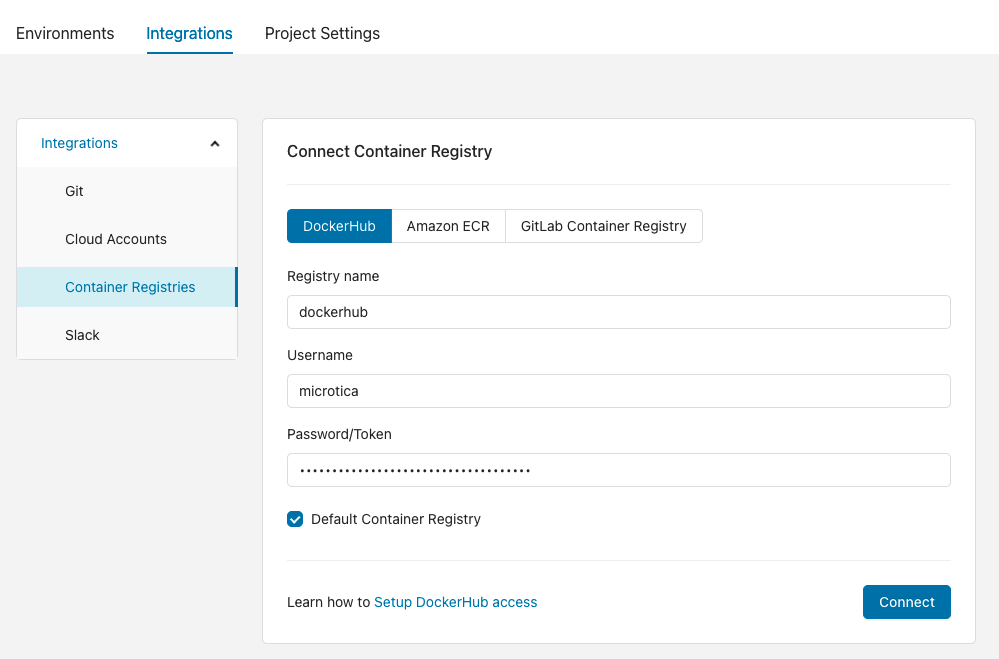
The name you give a registry when you connect it is the one you use in the pipeline YAML to set the artifact destination.
steps:
  BuildAndPushDocker:
    type: docker-push
    image_name: microtica/my-app
    tag: v0.1.0
    dockerfile: Dockerfile
    # optional, if not specified, default will be used
    registry: dockerhub
After the BuildAndPushDocker step completes, an image named microtica/my-app with tag v0.1.0 is pushed to the dockerhub registry connected in Microtica.
Next steps
Stages
Group pipeline steps into stages to run them in parallel. Declare stages in your microtica.yaml, assign steps to them, and structure complex pipelines.
Variables
Parametrize Microtica pipelines with custom and predefined variables. Reference built-in values like MIC_PIPELINE_EXECUTION_ID and store secrets securely.